Glyph Particles
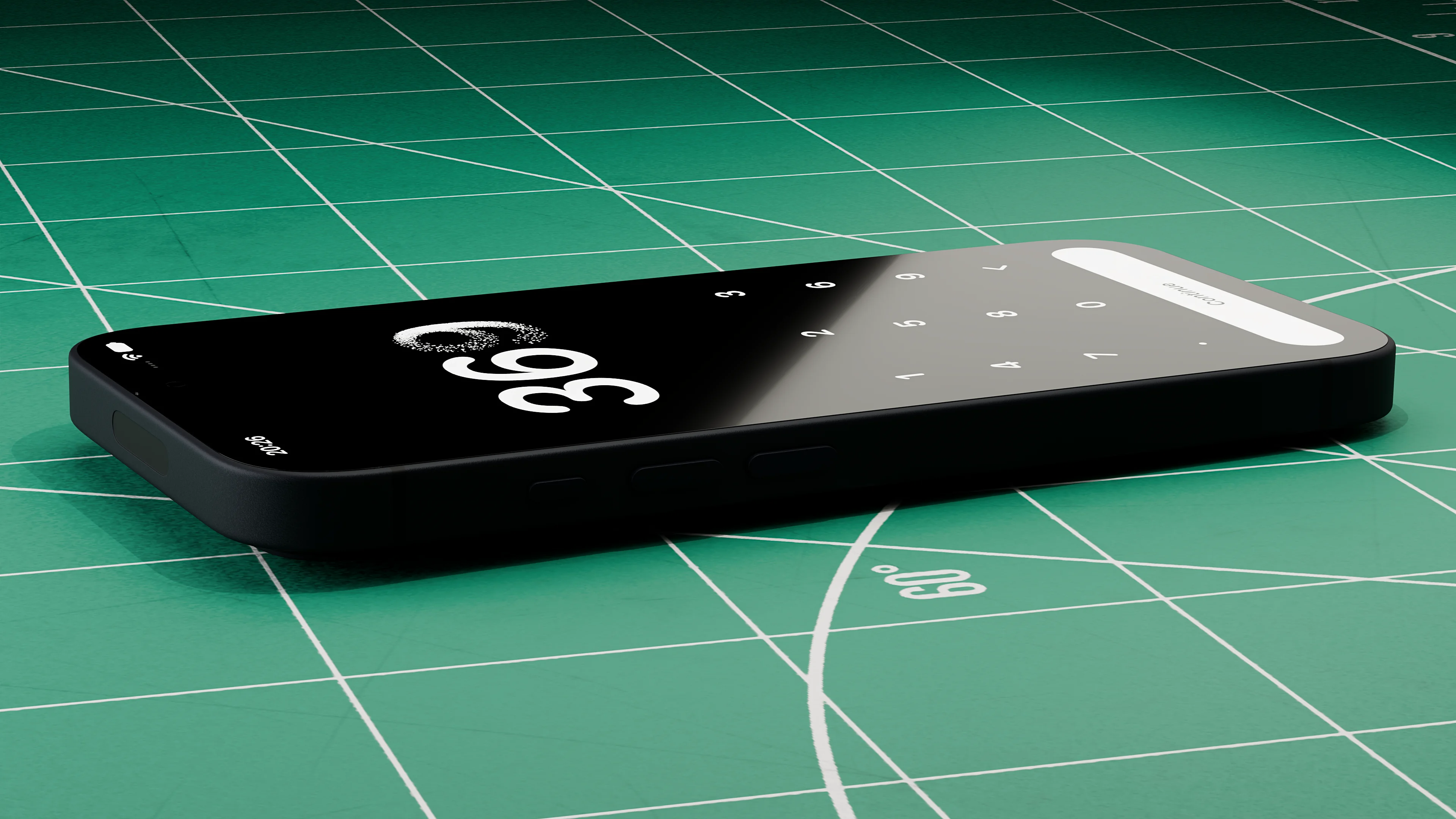
This started as a small Metal experiment.
Most text effects fade the glyph as particles appear. Timing makes the two look connected, but they’re separate effects.
I wanted to see what happened if the particles and glyph shared the same coverage.
Material handoff
Core Text lays out the glyphs, and Core Graphics rasterizes their paths into antialiased masks.1 Alpha gives the coverage at each pixel, including fractional values at the edges.
The shared release field controls when each pixel gives up coverage, using its position, interior distance, and a fixed hash.

let interior = min(interiorDistance[roiIndex] / maxDistance, 1)let sweep = localU * 0.72 + (1 - uv.y) * 0.28let breakup = hash2D(x: x, y: y, salt: 17)let interiorDelay = interiorlet release = min(max( 0.06 + sweep * 0.48 + breakup * 0.24 + interiorDelay * 0.28, 0.04), 0.96)releasePixels[index] = SIMD4<Float>(release, interior, 0, Float(glyph.index))The solid fragment shader uses that field to subtract transferred coverage from the mask.

float visualTransfer = massTransfer( visualRelease, uniforms.releaseProgress, true, uniforms.solidVisualSoftness);float remaining = coverage * (1.0 - visualTransfer);return float4(contentWhite(uniforms), remaining);Glyph compression
Each particle draws coverage from a group of mask pixels. A simple sampling grid can miss thin strokes, so seeds are sampled in proportion to alpha, with total coverage setting the target count. Every covered pixel is assigned to the nearest seed's Voronoi cell.
let targetCount = sourceTargetCount( validCoveredArea: validCoveredArea, coveredPixelCount: pixels.count)var rng = StableRNG(seed: 0xC0FFEE)let prefixMass = makePrefixMass(pixels)let seeds = makeVoronoiSeeds( pixels: pixels, prefixMass: prefixMass, count: targetCount, rng: &rng)// In makeVoronoiParticles, after building the spatial bins.var accumulators = seeds.map { VoronoiAccumulator(seed: $0) }for pixel in pixels { let nearest = nearestSeedIndex( to: pixel.localPixel, seeds: seeds, bins: bins, gridWidth: gridWidth, gridHeight: gridHeight, binSize: binSize, mode: mode ) accumulators[nearest].add(pixel)}Each nonempty cell becomes a source at its coverage-weighted center. Its mass is the sum of pixel coverage, rather than physical mass. Eight bins store coverage grouped by release value.
mutating func add(_ pixel: CoveredPixel) { mass += pixel.coverage weightedLocalUV += pixel.localUV * pixel.coverage weightedReleaseNormalUV += pixel.releaseNormalUV * pixel.coverage weightedInterior += pixel.interior * pixel.coverage let bin = min(max(Int(pixel.release * 8), 0), 7) if bin < 4 { releaseMass0[bin] += pixel.coverage } else { releaseMass1[bin - 4] += pixel.coverage }}The bins preserve total coverage but approximate release timing, using each bin's midpoint in place of its pixels' release values. Optional debug checks compare this approximation with the original mask.2
Incremental transfer
Elapsed time maps to lifecycleProgress through a cubic ease-out, then to releaseProgress through a power curve. This lets release timing change without altering the base curve. The renderer saves both values with each submitted frame; if either goes backward, the compute pass resets particle state.
The GPU adds only the coverage released since the previous frame.
float transferredMass = 0.0;for (uint index = 0; index < 8; ++index) { float release = (float(index) + 0.5) * 0.125; float currentTransfer = massTransfer( release, uniforms.releaseProgress, isActiveGlyph, uniforms.releaseSoftness ); float previousTransfer = massTransfer( release, uniforms.previousReleaseProgress, isActiveGlyph, uniforms.releaseSoftness ); transferredMass += releaseBinMass(source, index) * max(currentTransfer - previousTransfer, 0.0);}return transferredMass;Shape continuity
The glyph loses its shape if particles spread too soon, but restricting their motion for too long makes them look pinned to the mask.
The release field's negative gradient points toward areas that release coverage earlier, giving particles an initial direction.
A coverage-weighted average within each cell gives releaseNormalUV, which the compute shader combines with wind, curl, and variation from a fixed seed.
A particle may already be moving when more coverage arrives. The shader blends its velocity with the incoming velocity, weighted by their coverage. It also pulls the particle toward its source, with the strength set by the incoming fraction of total mass and the particle's age.
float totalMass = state.mass + transferredMass;float ratio = transferRatio(transferredMass, totalMass);bool isTransferFrame = transferredMass > 0.00001;if (isTransferFrame) { // After calculating direction, injectedSpeed, and birth visibility. state.velocityUV = ( state.velocityUV * state.mass + direction * injectedSpeed * transferredMass ) / max(totalMass, 0.0001); state.mass = totalMass; state.positionUV = mix( state.positionUV, source.localUV, birthAnchorStrength(ratio, state.age) ); state.alive = 1.0;}For surviving particles, state.mass tracks cumulative transfer. Alpha and radius fade separately, so this value does not measure rendered opacity.
Each source has a travel budget based on interior distance and coverage. The shader measures displacement along and across the release direction in screen pixels.
float2 scalePx = max(source.motionScaleUV * uniforms.rectSize, float2(0.0001));float2 deltaPx = (positionUV - source.localUV) * scalePx;float2 normalPx = normalize(source.releaseNormalUV * scalePx + float2(0.0001, 0.0));float2 tangentPx = float2(-normalPx.y, normalPx.x);float normalBudget = max(source.shapeTravelBudgetPx, 0.0001);float tangentBudget = normalBudget * 1.35;float normalRatio = abs(dot(deltaPx, normalPx)) / normalBudget;float tangentRatio = abs(dot(deltaPx, tangentPx)) / tangentBudget;return max(normalRatio, tangentRatio);Approaching the budget increases shapeBrake. Once most of the source's coverage has transferred, visualCoherence decays and weakens the brake, letting the particle drift farther.
float cumulativeMass = cumulativeTransferredMass(source, uniforms, sourceIsActiveGlyph);float sourceReleaseRatio = saturate(cumulativeMass / max(source.mass, 0.0001));float sourceReleased = smoothstep( releaseCompletionStart(uniforms), releaseCompletionEnd(uniforms), sourceReleaseRatio);// In the surviving-particle branch; shapeBrake was declared before transfer.float coherenceDecay = mix(0.0, coherenceDecayReleased(uniforms), sourceReleased);state.visualCoherence *= exp(-coherenceDecay * dt);shapeBrake = smoothstep(0.72, 1.0, shapeEscapeRatio(source, state.positionUV, uniforms));float coherentShapeBrake = shapeBrake * state.visualCoherence;Particle lifetime
The last occupied histogram bin determines sourceReleaseEnd, when the source finishes releasing coverage. Each particle starts fading shortly afterward. Its fade duration includes the time until the glyph's last source finishes releasing, plus a small, repeatable variation. At visibleEnd, the compute pass clears the particle's state and returns it to its source position.
The prepared asset sets visibleDuration to the later of the solid glyph's disappearance and the last particle's visibleEnd.
let solidTransferEnd = solidTransferDuration(solidMaxRelease: solidMaxRelease)let particleVisibleEnd = sources.reduce(TimeInterval(0)) { maxEnd, source in max(maxEnd, TimeInterval(source.visibleEnd))}return max(solidTransferEnd, particleVisibleEnd)Deletion lifecycle
For text deletion, the renderer keeps the old glyph's data after the app commits the new text so the coverage transfer and particle animation can finish. Each AmountEditTransaction has an ID so callbacks can distinguish edits even when the same text reappears.
Asset preparation
A background queue prepares the old glyph data, release texture, source buffer, and timing in a PreparedDeletionAsset. Because another edit may arrive before preparation ends, the result must still match the pending text, glyph range, and generation.
// After creating and storing the pending request.assetPipeline.requestPreparedDeletionAsset( displayGlyphAsset: displayGlyphAsset, glyphRange: targetRange) { [weak self] asset in guard let self, self.pendingDeletionRequest == request else { return } self.pendingDeletionRequest = nil guard self.canUseReadyDeletionAsset(asset) else { return } self.readyDeletionAsset = asset self.preparePendingDeletionIfNeeded()}Committing the edit
Before accepting the edit, the renderer checks that the app's text and displayed glyph asset match fromText. The prepared asset must also match that text and affectedRange.
guard pendingEdit?.id == transaction.id, canonicalText == transaction.fromText, presentationGlyphAsset?.text == transaction.fromText else { return }guard let preparedAsset = readyDeletionAsset, preparedAsset.text == transaction.fromText, preparedAsset.glyphRange == glyphRange else { return }If text remains, its glyph asset and layout plan must be ready. The renderer creates an ActiveDeletionRun that owns the prepared asset, particle state buffer, clock state, and transaction ID, then calls onEditAccepted.
SwiftUI checks the transaction ID and old text before applying the edit.
Animation start
The animation clock waits for SwiftUI to pass back the committed text and transaction ID. When both match the run, the renderer resets startedAt and lastFrameTime together, keeping preparation and SwiftUI delays out of the animation.
for index in deletionRuns.indiceswhere !deletionRuns[index].isCanonicalCommitted && deletionRuns[index].destinationText == text && deletionRuns[index].transactionID == transactionID { deletionRuns[index].isCanonicalCommitted = true deletionRuns[index].startedAt = now deletionRuns[index].lastFrameTime = now}GPU resource lifetime
While the solid glyph fades, the run draws it alongside its particles. Other glyphs stay where they are until visibleDuration, then shift into the destination layout.
The GPU may still be using the run's data when its duration ends. The renderer waits for successful command buffer completion before retiring the solid draw or removing the run.3
if run.phase == .extinction, elapsed >= run.asset.visibleDuration { deletionRuns[index].phase = .completing let id = run.id commandBuffer.addCompletedHandler { [weak self] completedBuffer in guard completedBuffer.status == .completed else { return } DispatchQueue.main.async { self?.completeExtinction(for: id, run: run) } }}transferringSolid → solidTransferDuration reached → committingSolid→ command buffer .completed → main-queue callback → extinction→ visibleDuration reached → completing→ command buffer .completed → main-queue callback → remove ActiveDeletionRunThe callback captures run to keep its asset and state buffer alive. Cached assets can remain after completeExtinction removes the run.
Result
Deletion finally works as intended, with particles drawing their coverage from the disappearing glyph.
Pretty happy with how this turned out.